Undelete 360 2.17
Undelete 360 2.17 – A Classic Recovery Tool That Still Gets the Job Done
In an age where data-recovery software keeps getting bulkier, pricier, and overloaded with features no everyday user asked for, Undelete 360 2.17 stands out as a refreshingly straightforward throwback. It’s lean, fast, and entirely focused on one thing: bringing your deleted files back before it’s too late.
Originally designed years before “smart recovery engines” were a buzzword, Undelete 360 has quietly maintained a loyal following—largely because it does exactly what it promises, without the fluff.
What Undelete 360 Actually Does
Undelete 360 scans for deleted files across a wide range of storage devices:
- USB flash drives
- External HDDs and SSDs
- Memory cards (SD, microSD, CompactFlash)
- Digital cameras and media players
- Internal Windows storage
If your files were recently deleted—whether through a mistake, a software crash, or an accidental format—Undelete 360 offers a quick and surprisingly effective recovery path.
What’s New in Version 2.17?
Version 2.17 doesn’t overhaul the software, but it brings several meaningful improvements:
Faster Scanning Engine
The updated scanning process is noticeably quicker on large-volume HDDs and modern SSDs, especially when performing a full-directory tree scan.
Better File-Type Recognition
Undelete 360 now recognises a broader set of modern file types, including newer camera RAW formats, recent Office versions, and more media codecs.
Stability Updates
Crashes related to NTFS indexing and damaged FAT partitions have been ironed out, making the recovery process smoother and less error-prone.
Enhanced Preview Module
The preview window now loads images, PDFs, and text documents more reliably — a huge help when you need to check whether a file is actually worth recovering.
Why People Still Use Undelete 360
Even with more advanced recovery tools on the market, Undelete 360 sticks around for a few key reasons:
It’s insanely lightweight
The installer is tiny, launches instantly, and uses almost no system resources.
The interface is simple
Two buttons — Scan and Recover. Anyone can figure it out.
Great for quick mistakes
Accidentally deleted a folder? Emptied the Recycle Bin too fast?
Undelete 360 shines in those “I just did something stupid” moments.
Zero learning curve
No confusing menus, no complex configuration, no technical jargon.
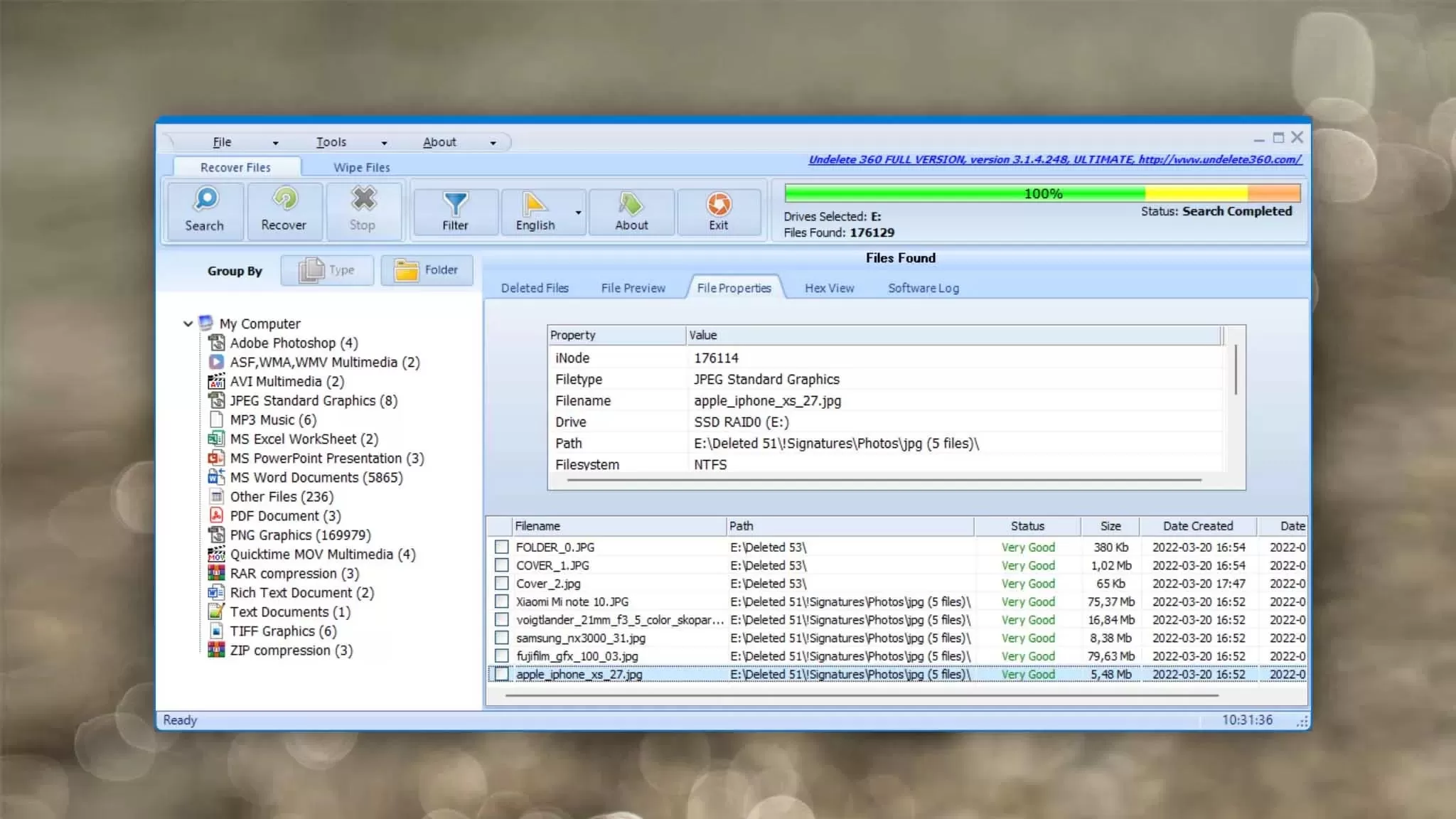
How to Use Undelete 360 (in 30 seconds)
- Launch the software.
- Select the drive you want to scan.
- Hit Search.
- Browse the scan results (sortable by type, date, and recoverability).
- Restore your files with a single click.
It really is that simple.
Limitations You Should Know About
To be fair, Undelete 360 isn’t a miracle worker:
- It struggles with heavily overwritten SSD sectors (thanks, TRIM).
- Deep recovery on severely corrupted drives is limited.
- The UI feels noticeably dated.
- No advanced forensic tools or RAW reconstruction modules.
But remember — it’s not trying to be a professional-grade suite.
Its sweet spot is fast, simple, everyday file recovery.
Who Is Undelete 360 2.17 For?
Perfect for:
- Students who delete the wrong assignment
- Photographers needing quick SD card recovery
- Home users who cleaned the Recycle Bin too aggressively
- Tech support workers wanting a lightweight toolkit addition
- Anyone who wants a free, no-nonsense option that just works
If you need deep forensic reconstruction or complex RAID recovery, there are stronger tools out there — but for 90% of everyday mishaps, Undelete 360 is more than enough.
Final Verdict
Undelete 360 2.17 may not be flashy, modern, or loaded with smart AI modules — and that’s exactly why it holds up so well. It’s fast, minimal, and incredibly easy to use, making it one of the most practical “first response” recovery apps you can keep on a Windows machine.
If you’re looking for a lightweight tool that won’t fight you with menus, paywalls, or complicated workflows, Undelete 360 still deserves a spot in your recovery toolkit.
Note: Tools files may be marked as malicious by antivirus. Be sure to check the file before downloading.
Comments & Ask Questions
Comments and Question
There are no comments yet. Be the first to comment!