Prime Video for Windows 1.0.76.0
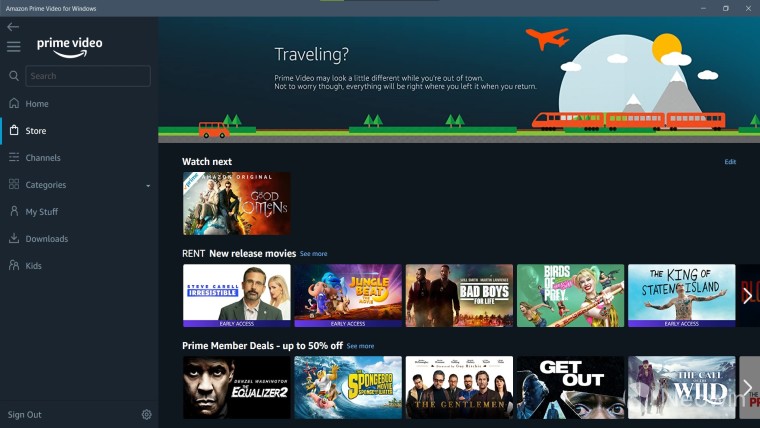
Amazon Prime Video App for Windows (Version 1.0.76.0)
Based on available data as of December 2025, it appears that "1.0.76.0" may refer to an earlier or internal build of the Prime Video app for Windows, as public release notes and download sites do not explicitly list this exact version. The app's versioning typically follows a pattern like "1.0.XXX.0," with the latest stable releases documented around 1.0.170–1.0.174. If you're encountering this version, it could be an outdated installation, a beta build, or a misreported number—consider checking for updates via the Microsoft Store for the most current experience. Below, I'll summarize key details about the app, its features, and how to handle potential issues.
Overview
- App Name: Prime Video (official Amazon app)
- Developer: Amazon.com, Inc.
- Platform: Windows 10/11 (64-bit recommended)
- License: Free (requires Amazon Prime subscription for full access)
- File Size: Approximately 76–77 MB (MSIX bundle format)
- Purpose: Streams movies, TV shows, Amazon Originals, and more. Supports offline downloads, rentals, and purchases
Key Features
- Streaming Quality: Up to Full HD (1080p). Note: 4K UHD and HDR are not supported on the Windows app (limited to compatible smart TVs like LG, Samsung, or Sony). Dolby 5.1 audio is also unavailable—use a browser for better quality if needed.
- Offline Downloads: Download movies/TV episodes for up to 48 hours (or 30 days if not started). Manage storage via app settings.
- Content Access: Full Prime library, including originals like The Boys, The Marvelous Mrs. Maisel, and Tom Clancy’s Jack Ryan. Add channels like Starz or Acorn TV.
- UI and Controls: Clean, browser-like interface with IMDb ratings, synopses, and personalized recommendations. Supports subtitles, audio tracks, and quality adjustments.
- Subscriptions: Included with Amazon Prime ($14.99/month or $139/year; student discounts available). Standalone Prime Video: $8.99/month (with ads; ad-free upgrade for $2.99 extra).
System Requirements
- OS: Windows 10 (version 1809+) or Windows 11.
- Processor: 1 GHz or faster.
- RAM: 1 GB (2 GB recommended for HD streaming).
- Internet: Minimum 900 Kbps for SD; 3.5 Mbps for HD; 15 Mbps for optimal performance. Wi-Fi recommended for downloads.
- Storage: 250 MB free space (plus room for downloads).
- Other: Microsoft Store access; compatible with Edge, Chrome, etc., for fallback browser streaming.
Common Issues and Fixes (Especially for Older Versions like 1.0.76.0)
- Playback Stuck at 1080p: The app caps at HD; for 4K, switch to a supported device or browser (e.g., Edge on Windows).
- Download Errors: Clear app cache (Settings > Apps > Prime Video > Advanced > Reset) or check storage limits.
- Crashes/Outdated UI: Force update via Microsoft Store (search "Prime Video" > Update). If unavailable, reinstall.
- No 4K/Dolby Support: Confirmed limitation—use web version at primevideo.com for potential higher quality (requires compatible hardware).
- Ads on Content: Ensure you're on an ad-free plan; some titles require rentals.
Note: Tools files may be marked as malicious by antivirus. Be sure to check the file before downloading.
Comments & Ask Questions
Comments and Question
There are no comments yet. Be the first to comment!