TDR Manipulator 1.2
TDR Manipulator 1.2 – Technical Overview and Operational Considerations
TDR Manipulator 1.2 is a specialized utility designed to modify the Windows Timeout Detection and Recovery (TDR) settings—parameters that govern how the operating system responds when the GPU becomes unresponsive. By default, Windows attempts to reset the graphics driver after a brief timeout (typically 2 seconds). While this behavior protects system stability, it can also interrupt heavy GPU workloads or trigger unwanted driver resets during stress-intensive tasks.
This tool provides direct access to the relevant registry values, enabling administrators and power users to adjust or disable the TDR mechanism depending on their workflow requirements.
Purpose and Use Cases
TDR Manipulator is primarily beneficial in environments where GPU load is sustained and prolonged, such as:
- 3D rendering and compositing workflows
- Scientific simulations leveraging CUDA/OpenCL
- High-end gaming with aggressive overclocks
- Machine learning and GPGPU workloads
- Systems undergoing stress testing or stability profiling
In these scenarios, the default timeout may prematurely trigger a reset, interrupting processes or generating avoidable driver recovery events.
Key Functions
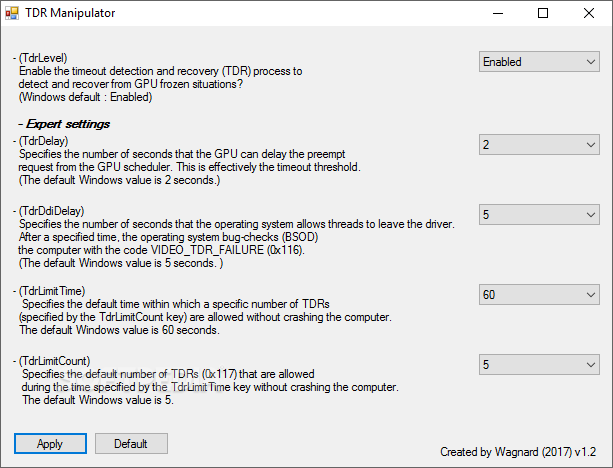
TDR Manipulator 1.2 allows users to modify:
- TdrDelay: The number of seconds Windows waits before initiating a GPU recovery.
- TdrDdiDelay: Additional delay before the OS intervenes at the driver-to-kernel interface.
- TdrLevel: Determines whether Windows attempts recovery, logs an event, or takes no corrective action.
By centralizing these parameters in a dedicated interface, the tool eliminates the need for manual registry editing and helps ensure consistent configuration across systems.
Operational Caveats
While extending or disabling TDR can prevent unnecessary resets, it also transfers responsibility to the user. If the GPU truly becomes unresponsive, the system may:
- hang for longer periods,
- freeze without automatic recovery,
- require a manual restart.
As such, TDR Manipulator should be applied cautiously, ideally on systems where reliability requirements are well understood and where users can diagnose GPU-related issues independently.
Final Assessment
TDR Manipulator 1.2 is a niche but valuable tool for users operating beyond everyday workloads. It offers direct control over a subsystem that Windows normally hides from casual users, enabling deeper optimization of GPU-based tasks. When used responsibly, it can reduce workflow interruptions and provide clearer insight into genuine stability problems.
Note: Tools files may be marked as malicious by antivirus. Be sure to check the file before downloading.
Comments & Ask Questions
Comments and Question
There are no comments yet. Be the first to comment!