WhatInStartup 1.35
WhatInStartup 1.35 – A Detective’s Lens on Your Boot Process
If your PC has been feeling slower every morning—like it needs a cup of coffee before it even loads the desktop—there’s a good chance something suspicious is sneaking into your startup routine. WhatInStartup 1.35 acts like a calm, collected investigator who quietly lifts the curtain on every program that tries to run when Windows boots.
A Transparent Look Behind the Scenes
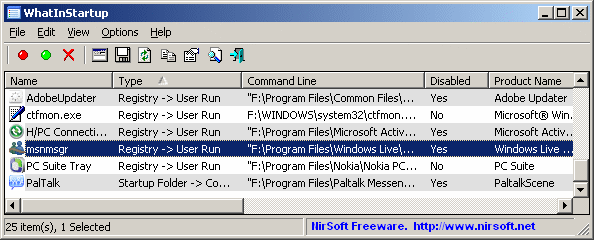
WhatInStartup doesn’t overwhelm you with graphs or animations. Instead, it presents a clean list of:
- Every startup entry
- Its file location
- Its command line
- Its creation date
- Its status (enabled/disabled)
It’s the kind of information you wish Windows provided by default—but never does.
Disable Without Deleting
One of the most valuable features is its “permanent disable” mode, which prevents a startup entry from reactivating itself. This is especially useful for software that insists it knows better than you and keeps trying to reinsert itself into boot processes.
You can disable items, delete them entirely, or even create a lightweight “startup profile” that you can export and review later.
No Nonsense, No Bloat
WhatInStartup is portable, extremely light, and loads instantly—even on older machines. That simplicity is exactly what makes it powerful: it shows the truth of what’s happening inside Windows without trying to redesign or reinterpret it.
There’s no marketing language, no tuning claims—just raw, practical information.
Who Benefits Most?
- Users cleaning up slow PCs
- Technicians diagnosing malware-like behavior
- Power users organizing minimal boot routines
- Anyone who hates software that auto-starts without permission
It’s the perfect companion for anyone who wants clarity instead of clutter.
Final Verdict
WhatInStartup 1.35 doesn’t try to dazzling you because it doesn’t need to.
It’s a straightforward, trustworthy tool that exposes exactly what’s waking up with your system each time you press the power button.
Quiet, direct, dependable—just what you want in a startup detective.
Note: Tools files may be marked as malicious by antivirus. Be sure to check the file before downloading.
Comments & Ask Questions
Comments and Question
There are no comments yet. Be the first to comment!