SyncBreeze 11.4.16
SyncBreeze 11.4.16 – A Technical Look at High-Performance File Synchronization
SyncBreeze 11.4.16 is built for environments where file consistency and data integrity are critical—whether that’s a small office with shared folders or a large-scale storage setup. It’s not a flashy tool, nor does it try to be one; instead, it focuses on precision, reliability, and efficiency in file synchronization workflows.
Architecture & Core Functionality
At its foundation, SyncBreeze operates on a high-performance sync engine capable of comparing and updating thousands of files with minimal overhead. The software supports:
- Real-time sync, triggered the moment a directory changes
- Periodic synchronization, ideal for scheduled backups
- Manual one-click sync, for controlled tasks
- Multi-threaded operations, enabling parallel processing on modern CPUs
This makes it suitable for users who manage large folders, media libraries, project directories, or shared network drives.
Storage & Network Compatibility
SyncBreeze is highly flexible when it comes to storage environments. It supports:
- Local disks
- NAS/SAN storage
- Mounted network shares
- External drives
- Enterprise storage servers
Administrators can also define inclusion and exclusion rules, making it possible to synchronize only specific file types or ignore transient data such as temporary caches.
Reporting & Analysis
One of SyncBreeze’s most underrated strengths is its detailed reporting engine. After a sync operation, the tool generates structured reports containing:
- File counts
- Modified vs. skipped items
- Data transfer metrics
- Error logs
- Time-to-complete benchmarks
For IT staff, these reports can be exported, archived, and analyzed to ensure long-term consistency across machines or storage arrays.
Configuration Flexibility
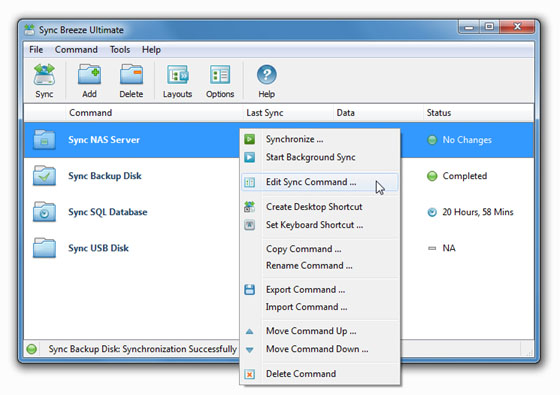
While SyncBreeze provides a GUI suitable for everyday users, it also offers advanced control for professionals:
- Command-line launcher
- Policy-based configuration
- Automated profiles for repetitive sync tasks
- Bandwidth throttling for network environments
These features make it possible to apply the software in anything from a home workstation to a small business server.
Final Verdict
SyncBreeze 11.4.16 isn’t meant to entertain—it’s meant to work, and work reliably. It provides one of the most stable and configurable synchronization systems available for Windows, with a strong emphasis on performance and administrative control.
For users who value predictable, transparent, and technically robust file syncing, SyncBreeze remains a top-tier choice.
Note: Tools files may be marked as malicious by antivirus. Be sure to check the file before downloading.
Comments & Ask Questions
Comments and Question
There are no comments yet. Be the first to comment!